An address field can look like a small part of an ecommerce checkout, but it has a direct impact on customer experience, delivery success and the quality of the data entering your systems.
Autoaddress uses address validation as a broad term covering services that improve address accuracy, including autocomplete. In this article, address verification refers specifically to checking an address for completeness and accuracy. Autocomplete and verification are closely related, but they perform different roles in the checkout journey.
Address autocomplete helps a customer enter their address quickly and accurately. Address verification checks whether an address is complete, accurate and suitable for delivery – including addresses that may not have been entered through your usual checkout form.
For a reliable ecommerce checkout, it is often not a question of choosing one or the other. It is about understanding where each fits in the customer journey.
What is address autocomplete?
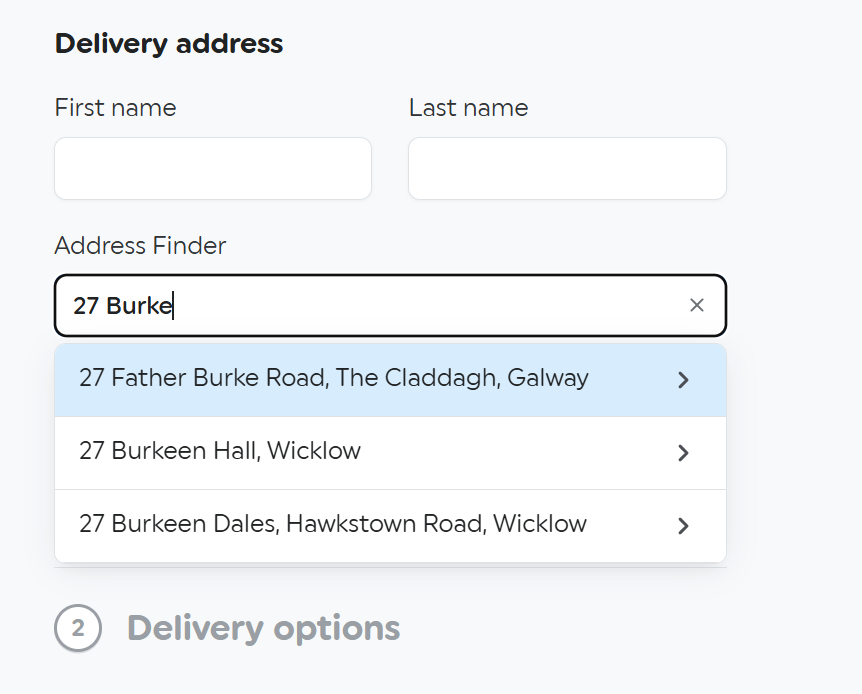
Address autocomplete helps customers find and enter an address as they type.
Instead of manually completing every field, the customer begins entering their address and sees matching suggestions in real time. Once they select the right option, the full address can be returned to the checkout in the correct format.
This makes the checkout faster and reduces common errors such as:
- Misspelled street names
- Missing postcode or Eircode information
- Incomplete address lines
- Inconsistent formatting
- Incorrect or missing apartment, suite or unit details
For ecommerce retailers, autocomplete is primarily about preventing issues at the point of entry. It removes friction for the customer while helping the business collect better address data from the start.
What is address verification?
Address verification checks whether an address is complete, accurate and deliverable.
This is particularly important when the address does not come directly from a standard checkout form. For example, a customer may use an express checkout option or digital wallet that supplies a saved address automatically. They may also enter an address manually, or an address may arrive from another external system.
In these situations, a retailer can lose the opportunity to guide the customer with autocomplete before the order is placed.
Address verification provides a second layer of control. It can identify whether an address is valid, whether information is missing, whether there is a likely correction, or whether the address should be rejected based on delivery rules.
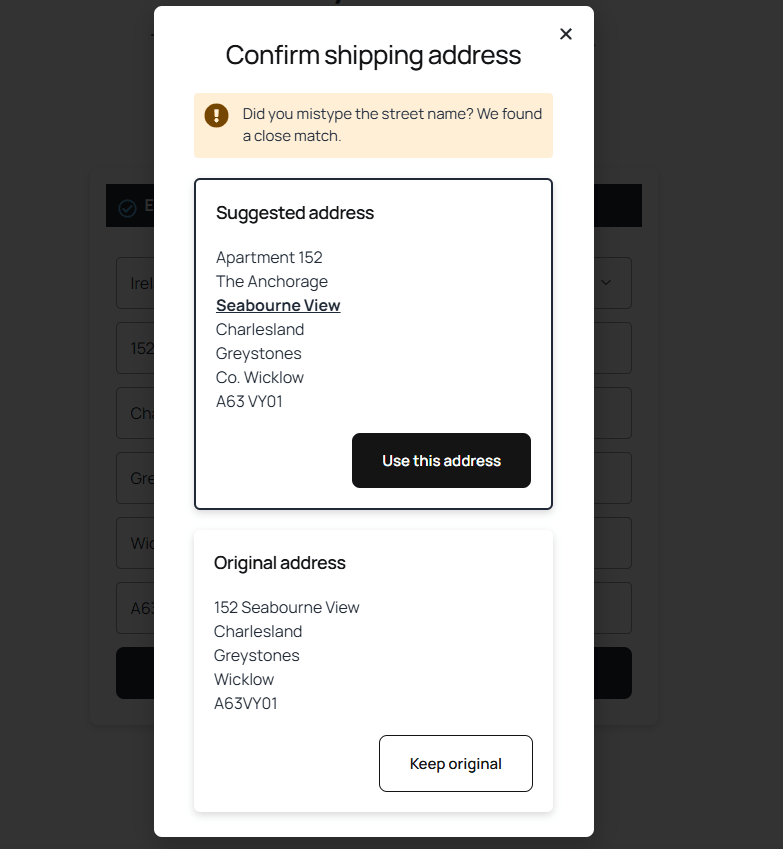
For example, Autoaddress Verify can return one of four outcomes:
- Accepted – the address is valid and no changes are needed.
- Needs confirmation – information may be missing, such as a flat number or postcode.
- Suggestion – a close match has been found and the customer can select the correct address.
- Rejected – the address is invalid or cannot be delivered under the business’s rules.
Address autocomplete vs address verification: the key difference
Address autocomplete
Address verification
Helps customers enter an address quickly
Checks whether an address is complete and deliverable
Works while a customer fills in an address form
Can check addresses from express checkout, digital wallets, manual entry or external systems
Reduces typing and checkout friction
Identifies missing, inaccurate or undeliverable addresses
Helps prevent errors at the start
Catches issues before an order is dispatched
Returns a complete, formatted address after selection
Returns a result such as accepted, needs confirmation, suggestion or rejected
Autocomplete is proactive: it helps customers get the address right as they enter it.
Verification is a safeguard: it identifies issues where an address may have bypassed the usual checkout journey or still requires further checking.
When is address autocomplete enough?
Address autocomplete may be enough where all customers enter their delivery details through a standard checkout form and you want to make that process faster, easier and more accurate.
It is especially useful for retailers looking to:
- Reduce manual address entry
- Improve checkout completion
- Capture complete address details at the first attempt
- Standardise address data before it reaches a CRM or order-management system
- Handle more complex address structures, including apartments and business units
However, ecommerce checkouts are increasingly varied. Express checkout options can replace the address entered on your form with a saved wallet address, and that information may be outdated, incomplete or unsuitable for your delivery rules.
That is where verification becomes important.
When do ecommerce retailers need address verification as well?
Address verification is particularly valuable when your checkout accepts addresses from more than one source.
Common examples include:
Express checkout and digital wallets
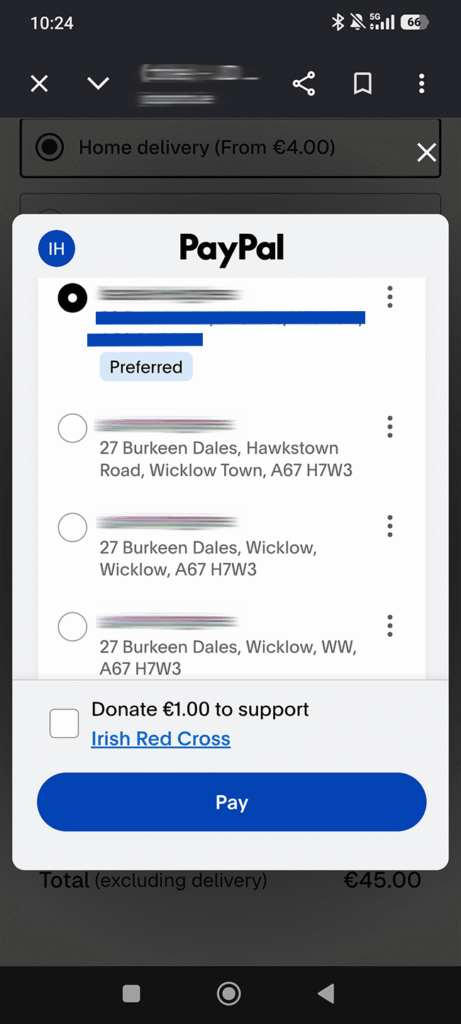
A customer may complete an order through an express checkout option that uses a saved address. If that address bypasses your usual form, it may also bypass the autocomplete and address rules you have put in place.
Verification gives you the opportunity to identify missing or unsuitable details before fulfilment begins. This is especially helpful as many digital wallets may contain variations of the same address.
Apartment, suite and unit numbers
A building-level address is not always enough for a successful delivery. Tools such as Google do not populate specific apartment numbers, or even postcodes in some cases. Missing information such as this can create extra support work, delays and failed deliveries.
However, a robust autocomplete API will prompt customers to select the right level of detail, while verification can flag cases where further confirmation is needed.
Manual entry and external systems
Not every address comes from the same place. Call-centre teams, customer-service teams, marketplaces, CRMs and other systems can all introduce address data into the order journey.
Verification helps create a consistent standard before an order is dispatched.
Delivery restrictions
Some retailers have rules around delivery areas, PO boxes or serviceable locations. Address verification can support these rules by identifying addresses that should be reviewed or rejected before shipping.
Why retailers often need both
The strongest checkout journey combines address autocomplete and address verification.
Autocomplete improves the customer experience when someone is entering their address. It reduces keystrokes, helps the customer select a complete address and returns information in the required format.
Verification provides protection when the address comes from somewhere else or requires a further deliverability check.
Together, they help retailers:
- Reduce incomplete and inaccurate address data
- Avoid avoidable delivery issues
- Minimise manual address corrections
- Improve the consistency of CRM and order data
- Create a smoother checkout experience without compromising delivery accuracy
A real ecommerce example: Best Price Nutrition
Best Price Nutrition, a BigCommerce retailer, needed more control over address accuracy at checkout.
The built-in verification used by its shipping platform’s sometimes removed unit numbers or replaced valid ZIP codes with incorrect ones. The team then had to manually review orders, creating additional operational work and unnecessary shipping costs.
The business also tried Google Places Autocomplete, but found the pricing and API usage difficult to control. Every letter typed by a customer could trigger an API call, without a straightforward way to manage usage.
After moving to the Autoaddress BigCommerce plugin, customers could complete their addresses more reliably. Address prompts helped customers provide apartment or suite information where needed, while the business reduced incorrect checkout addresses and removed reliance on backend fixes and manual customer-support intervention.
Choosing the right approach for your checkout
If your main goal is to make address entry faster and more accurate, start with address autocomplete.
If you need to check delivery addresses from express checkout, digital wallets, manual entry or external systems, address verification is essential.
For many ecommerce businesses, using both delivers the best outcome: a faster, lower-friction checkout for customers and stronger protection against costly delivery problems.
Whether you use Shopify, BigCommerce or a custom ecommerce checkout, accurate address data should be part of the customer journey from the moment an address is entered through to fulfilment.
Frequently asked questions
Is address autocomplete the same as address verification?
No. Address autocomplete helps a customer find and enter an address as they type. Address verification checks whether an address is complete, accurate and suitable for delivery.
Do I need address verification if I already use autocomplete?
Often, yes. Autocomplete improves your normal checkout form, but it may not check addresses supplied by express checkout options, digital wallets, manual entry or external systems. Verification provides an additional safeguard.
Can address autocomplete reduce failed deliveries?
It can help reduce failed deliveries by encouraging customers to select complete, accurate address details at the start of the checkout journey. Verification adds further protection by identifying addresses that are incomplete, inaccurate or unsuitable for delivery.
Can address verification identify missing apartment numbers?
Yes. Where key information such as a flat, apartment or unit number is missing, address verification can return a result that asks the customer to confirm or complete the address before the order proceeds.
Can Autoaddress support Shopify and BigCommerce checkouts?
Yes. Autoaddress provides ecommerce integrations for Shopify and BigCommerce, as well as API options for websites and applications that need a custom implementation.
How does address verification relate to address validation?
Autoaddress uses address validation as an umbrella term for its address-data services, including autocomplete. Address verification describes the specific process of checking address data for completeness and accuracy, as provided by Autoaddress Verify.