When it comes to validating Irish addresses, Eircodes play a vital role in pinpointing exact delivery points. Validating them correctly, however, isn’t always straightforward. At first glance, using a regular expression (RegEx) to check an Eircode seems like a simple, efficient solution; after all, Eircodes do follow a fixed format.
While RegEx can confirm whether an input looks like an Eircode, it can’t confirm whether it’s a real, active one or if it accurately matches the address it’s attached to. In this article, we’ll show how to write a RegEx pattern to validate Eircodes syntactically and explain why that alone isn’t enough for reliable data validation in critical workflows like delivery, fraud prevention, or address capture.
Eircode(7) = Routing Key(3) + Unique Identifier(4)
The first three characters of an Eircode make up what’s called the Routing Key. Routing keys were introduced as part of the Eircode system to help with mail sorting and delivery. They are linked to post towns in Ireland’s mail distribution network, based on a hub-and-spoke sorting model used by An Post.
There are 139 Routing Keys and they are all three characters. With the exception of D6W, all other Routing Keys follow a Letter-Number-Number format, e.g. A86.
The Unique Identifier is always four characters long. Valid characters are the numbers 0 to 9 and the following fifteen letters A,C,D,E,F,H,K,N,P,R,T,V,W,X,Y. These are also the only valid letters for the start of a Routing Key.
What about letters B,G,I,J,L,M,O,Q,S,U,Z ?
They are not used for the following reasons
| Letter | Reason |
|---|---|
| B | An Eircode starting with B could be confused with a Northern Ireland BT postcode. Also B can be confused with the number 8 |
| G | Lower case g can look like the number 9 |
| I | Upper and lower case versions can be confused with letters J(j), L(l) and number 1 |
| J | Upper and lower case versions can be confused with letters I(i), L(l) and number 1 |
| L | Upper and lower case versions can be confused with letters I(i), L(l) and number 1 |
| M | Sounds like N |
| O | Can be confused with number 0 |
| Q | Can be confused with number 0 |
| S | Can be confused with number 5 |
| Z | Can be confused with number 2 |
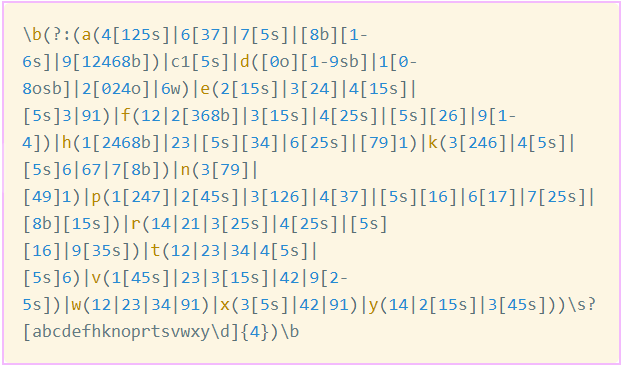
This regular expression detects all valid 139 Eircode Routing Keys and Unique Identifiers. It recognizes the optional space between the Routing Key and Unique Identifier, e.g., D08XY00 or d08 xy00. It should be called with a case-insensitive flag.
\b(?:(a(4[125s]|6[37]|7[5s]|[8b][1-6s]|9[12468b])|c1[5s]|d([0o][1-9sb]|1[0-8osb]|2[024o]|6w)|e(2[15s]|3[24]|4[15s]|[5s]3|91)|f(12|2[368b]|3[15s]|4[25s]|[5s][26]|9[1-4])|h(1[2468b]|23|[5s][34]|6[25s]|[79]1)|k(3[246]|4[5s]|[5s]6|67|7[8b])|n(3[79]|[49]1)|p(1[247]|2[45s]|3[126]|4[37]|[5s][16]|6[17]|7[25s]|[8b][15s])|r(14|21|3[25s]|4[25s]|[5s][16]|9[35s])|t(12|23|34|4[5s]|[5s]6)|v(1[45s]|23|3[15s]|42|9[2-5s])|w(12|23|34|91)|x(3[5s]|42|91)|y(14|2[15s]|3[45s]))\s?[acdefhknprtvwxy\d]{4})\b
The following example Javascript function takes a single Eircode and validates it. We’ve modified the regular expression to make the following substitutions
- Letter O to Number 0
- Letter Q to Number 0
- Letter i to Number 1
- Letter l to Number 1
- Letter S to Number 5
- Letter Z to Number 2
- Letter B to Number 8
We upper-case the result, remove any spaces and return the result. If the Eircode is not valid it returns an empty string.
					function validateEircode(eircode) {
  // 1) Normalise first: uppercase + character substitutions
  var s = String(eircode)
    .toUpperCase()
    .replace(' ', '')   // strip the space between routing key & unique
    .replace(/O/g, 0)   // make substitutions
    .replace(/Q/g, 0)
    .replace(/I/g, 1)
    .replace(/l/g, 1)
    .replace(/S/g, 5)
    .replace(/Z/g, 2)
    .replace(/B/g, 8);

  // 2) Check pattern
  var pattern =
    '\\b(?:(' +
    'a(4[125s]|6[37]|7[5s]|[8b][1-6s]|9[12468b])|' +
    'c1[5s]|' +
    'd([0o][1-9sb]|1[0-8osb]|2[024o]|6w)|' +
    'e(2[15s]|3[24]|4[15s]|[5s]3|91)|' +
    'f(12|2[368b]|3[15s]|4[25s]|[5s][26]|9[1-4])|' +
    'h(1[2468b]|23|[5s][34]|6[25s]|[79]1)|' +
    'k(3[246]|4[5s]|[5s]6|67|7[8b])|' +
    'n(3[79]|[49]1)|' +
    'p(1[247]|2[45s]|3[126]|4[37]|[5s][16]|6[17]|7[25s]|[8b][15s])|' +
    'r(14|21|3[25s]|4[25s]|[5s][16]|9[35s])|' +
    't(12|23|34|4[5s]|[5s]6)|' +
    'v(1[45s]|23|3[15s]|42|9[2-5s])|' +
    'w(12|23|34|91)|' +
    'x(3[5s]|42|91)|' +
    'y(14|2[15s]|3[45s])' +
    ')[acdefhknprtvwxy\\d]{4})\\b';

  var reg = new RegExp(pattern, 'i');

  var match = s.match(reg);
  if (match) {
    return match[0];   // the matched 7-character Eircode
  }

  return "";

}
Limitations of using RegEx
While this RegEx does provide form field validation, it doesn’t ensure that the Eircodes captured are correct. The following limitations apply:
- Is the Eircode real?
D01 1111 will pass a validation check, but it isn’t a real Eircode that has been assigned to an address. - Does it match the address?
Even if the Eircode is valid, it may not match the address provided, so which is correct?